Gathering the right tools upfront prevents damage to delicate components and speeds up the repair process.
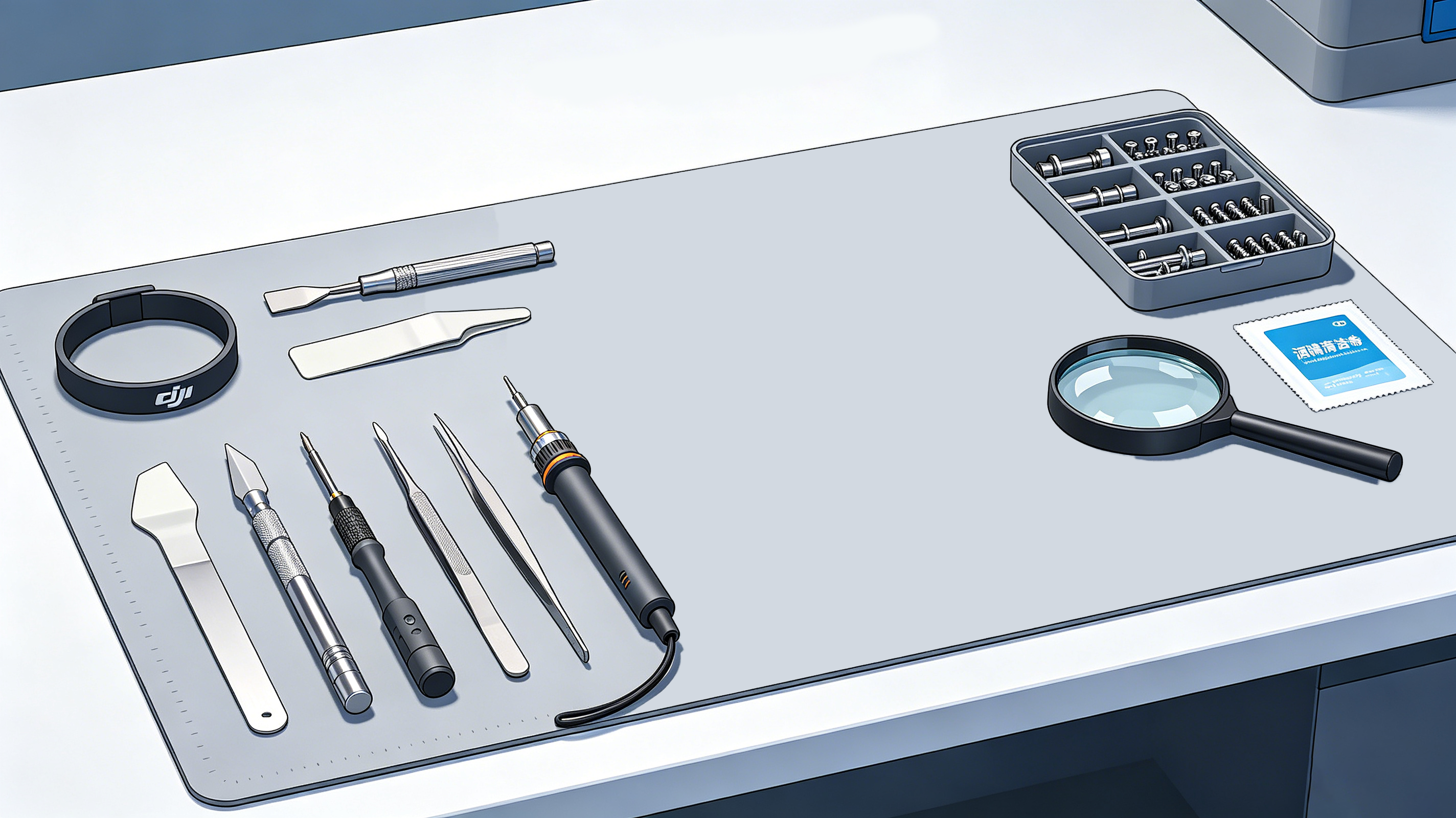
| Tool |
Purpose |
| Precision screwdriver set (Phillips & Torx) |
Remove tiny housing and mounting screws |
| Plastic pry tool / spudger |
Pry open casings without scratching plastic or damaging circuits |
| Fine-tip anti-static tweezers |
Handle small connectors and route thin wires |
| Soldering iron (for select models) |
Reattach soldered motor leads on older drone models |
| ESD anti-static wrist strap |
Prevent electrostatic discharge damage to circuit boards |
| Magnifying glass or loupe |
Inspect tiny connectors and flex cable contacts |
| Isopropyl alcohol (90%+) |
Clean adhesive residue and dust from motor mounts |
Pro tip: Use a magnetic screw mat or labeled containers to organize screws by size — DJI uses multiple screw lengths across the gimbal assembly, and mixing them up can crack internal components.
Step-by-Step DJI Gimbal Motor Replacement Guide
Follow these steps carefully to avoid damaging fragile gimbal components.
Step 1: Fully Power Down the Drone
Safety is always the first priority.
- Power off the drone and remove the battery completely.
- Take off all propellers to prevent accidental injury.
- Disconnect any external power sources or cables.
Never attempt repair work on a powered or battery-connected drone.
Step 2: Remove Gimbal Housing & Covers
Start by accessing the gimbal assembly:
- Remove the camera lens cover and any protective gimbal brackets.
- Use a plastic pry tool to gently release the front gimbal shell clips, then lift off the housing.
- Keep all removed screws organized by length and location.
Note: For many DJI models, you will need to remove the gimbal damping plate or vibration isolation mount first to access the motor assembly.
Step 3: Disconnect Gimbal Ribbon Cables
The gimbal uses thin, fragile flex cables to transmit power and control signals.
- Use tweezers or a pry tool to carefully flip up the connector locking tabs.
- Gently pull the cable straight out of the connector — never yank or twist the cable itself.
- Lay cables out in their original orientation to avoid misrouting during reassembly.
Step 4: Remove the Faulty Motor
Motor mounting varies by DJI model — they may be screw-mounted, press-fitted, or connected via soldered wires.
- Remove the motor mounting screws and any retaining adhesive.
- For soldered models, heat the solder joints carefully and detach the motor leads.
- Lift the motor straight out to avoid bending the gimbal frame or shaft.
Inspect the motor mount and frame for bends or damage while you have access.
Step 5: Install the New Replacement Motor
Proper alignment is critical for stable performance.
- Install the new motor in the exact same orientation as the original.
- Align the motor shaft perfectly with the gimbal arm mount.
- Route all wires following the factory cable path exactly.
- Tighten mounting screws evenly and gradually — do not overtighten, as this can crack the motor housing or bind the bearings.
Even a 1mm misalignment can cause calibration failures or persistent vibration.
Step 6: Reconnect All Flex Cables
Poor cable connections are the #1 cause of failed DIY repairs.
- Insert each ribbon cable straight into its connector, ensuring the contact pins align correctly.
- Press the locking tab firmly into place to secure the connection.
- Double-check that no cables are pinched, twisted, or stretched between components.
Step 7: Reassemble the Gimbal & Drone
Work in reverse order to put everything back together:
- Reinstall the gimbal housing, brackets, and damping mounts.
- Visually inspect all gaps and alignment before tightening the final screws.
- Replace the lens cover once assembly is complete.
Avoid touching the camera sensor or lens glass with bare fingers — wear nitrile gloves if possible to prevent oil smudges.
Step 8: Run Full Gimbal & System Calibration
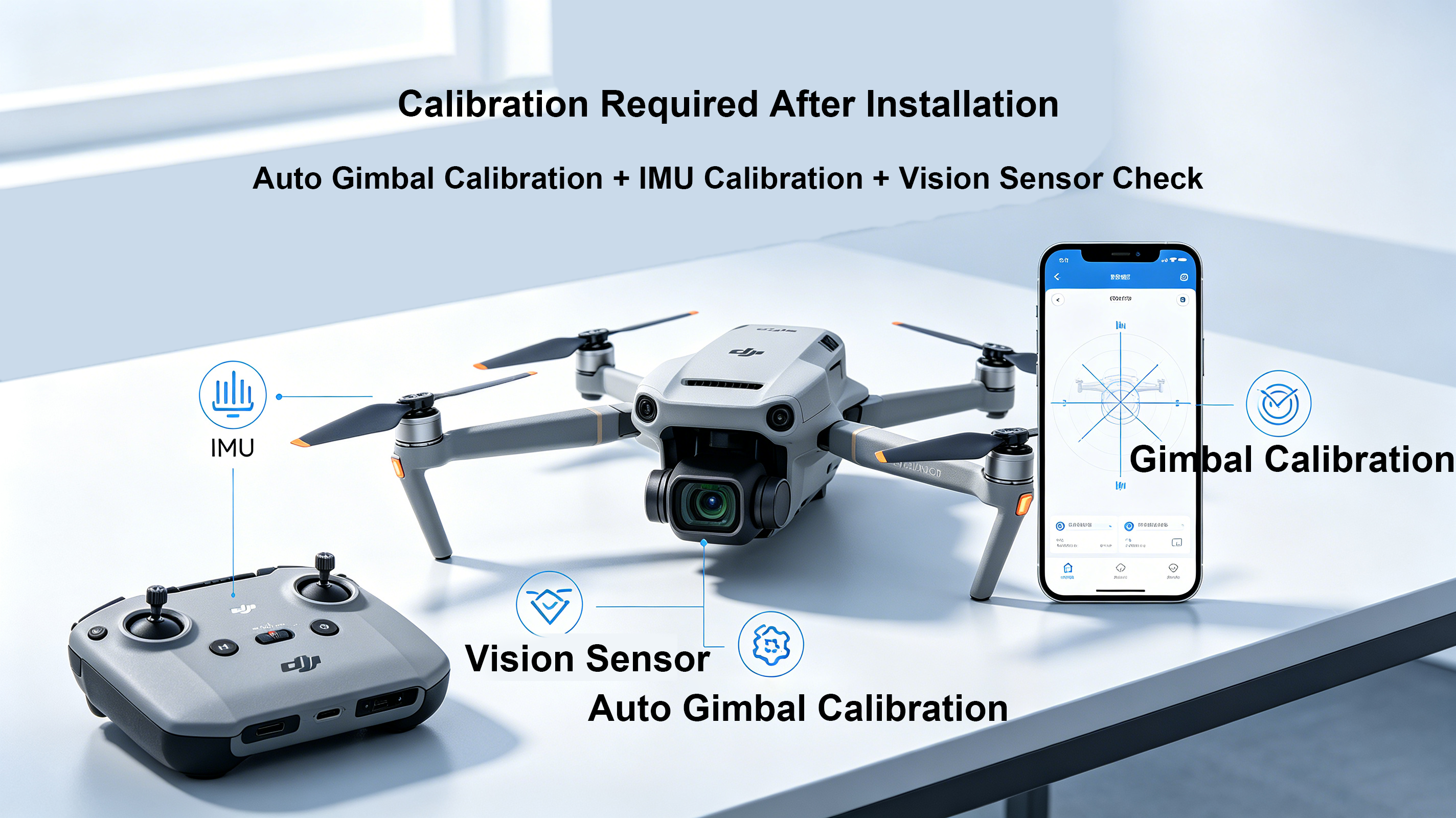
After hardware installation, calibration is non-negotiable.
- Reinstall the battery and power on the drone on a flat, level surface.
- Open your DJI flight app (DJI Fly / DJI Go 4 / DJI Pilot, depending on your model).
- Run an Auto Gimbal Calibration first to sync the new motor with the flight controller.
- For best results, follow up with an IMU Calibration to ensure accurate horizon alignment.
- If your drone has vision sensors, run a vision sensor calibration as well.
Calibration ensures the new motor works in sync with the drone’s stabilization system for smooth, drift-free footage.
Common DIY Repair Mistakes to Avoid
Even experienced technicians can run into issues. Steer clear of these frequent errors to ensure a successful repair.
1. Using an Incompatible Motor
Every DJI drone series (Mini, Air, Mavic, Matrice) uses unique gimbal motors with different dimensions, torque ratings, and connector types. Always confirm full compatibility with your exact drone model before purchasing a replacement.
2. Reusing a Damaged Flex Cable
If the ribbon cable has visible cracks, bent pins, or frayed edges, replace it at the same time as the motor. A damaged cable will cause intermittent errors, overload warnings, or total gimbal failure even with a brand new motor.
3. Touching Camera Optics
Fingerprints and oil on the lens or sensor will degrade image quality and require extra cleaning. Handle the camera assembly by its frame only, and wear gloves when possible.
4. Skipping Post-Repair Calibration
Installing a new motor without calibration almost always leads to problems: shaky footage, crooked horizon, or repeated gimbal overload errors. Calibration takes just a few minutes and is required for proper function.
5. Overtightening Mounting Screws
Gimbal motor housings are made of lightweight aluminum or plastic. Overtightening screws can crack the housing, bind the internal bearings, or warp the motor shaft — ruining your new part before you even use it.
Should You Replace Just the Motor, or the Entire Gimbal Assembly?
When your gimbal fails, you have two repair paths. Here’s how to choose:
| Gimbal Motor Only Replacement |
Full Gimbal Assembly Replacement |
| Significantly lower cost |
Much higher overall cost |
| Reduces e-waste, more eco-friendly |
Faster, simpler installation |
| Requires basic technical repair skills |
Beginner-friendly, no fine disassembly |
| Retains your original camera sensor |
Replaces camera, motors, and frame together |
For most cases where only one motor is confirmed faulty, motor-only replacement is the most cost-effective and practical solution. Full assembly replacement makes sense only if the gimbal frame is bent, the camera sensor is damaged, or multiple internal parts have failed.
How to Choose a High-Quality DJI Gimbal Replacement Motor
Replacement motor quality varies widely across suppliers. A low-quality motor will fail quickly and can even damage other gimbal components. Look for these key criteria:
- Precision dynamic balancing: Pre-balanced motors eliminate vibration and reduce calibration failures
- OEM-matched specifications: Matching torque, winding resistance, and dimensions for plug-and-play fit
- High-precision bearings: Smooth, low-friction bearings for quiet operation and long service life
- Rigorous quality testing: Motors tested for torque, resistance, and smooth rotation before shipping
- Compatible connector design: No modification required for installation on your specific drone model
Investing in a reliable replacement motor reduces repair rework and extends the lifespan of your gimbal.
Compatible DJI Drone Models
Replacement gimbal motors are widely available for all major DJI product lines:
Always verify compatibility with your exact drone model and camera version before placing an order.
Your Trusted Source for DJI Drone Replacement Parts
We specialize in supplying premium-grade DJI replacement parts for repair technicians, drone shops, distributors, and hobbyists worldwide. Our inventory is stocked with rigorously tested components built to match OEM performance standards.
What you get when you source parts from us:
- OEM-equivalent quality for reliable, long-lasting repairs
- Large in-stock inventory with same-day shipping on most orders
- Fast global delivery to keep your repair projects on schedule
- 100% quality inspection on every part before dispatch
- Professional technical support to help with compatibility and repair questions
- Flexible OEM and wholesale pricing for bulk orders
Whether you need a single gimbal motor for a DIY repair or bulk drone components for your repair business, we have the parts and expertise to keep your drones flying.
Frequently Asked Questions (FAQ)
Can I replace a DJI gimbal motor myself?
Yes. With the right precision tools, patience, and careful attention to detail, most users with basic technical skills can complete this repair successfully. First-time DIYers should follow a step-by-step guide closely and take extra care with fragile flex cables and connectors.
How long does the replacement take?
An experienced repair technician can typically complete the job in 30–60 minutes. First-time DIY users should plan for 1–2 hours to work slowly and avoid mistakes.
Do I have to calibrate the gimbal after replacing the motor?
Absolutely. Auto Gimbal Calibration is mandatory after installing a new motor to ensure proper synchronization with the flight controller. We also recommend performing an IMU calibration for optimal stabilization accuracy and horizon alignment.
Why is my gimbal still shaking after motor replacement?
Persistent shake or overload errors usually stem from one of these issues:
- Damaged or improperly connected gimbal flex cable
- Misaligned motor installation or bent gimbal frame
- Loose mounting screws
- Incomplete or failed calibration
- Faulty IMU or vision sensor hardware
If calibration does not resolve the issue, inspect the entire gimbal assembly for secondary damage.
Can I use a third-party replacement motor?
Third-party motors can work well, but quality varies drastically between manufacturers. For stable performance and long service life, choose third-party motors with OEM-matched specifications, factory balancing, and high-quality bearings. Avoid ultra-cheap, untested motors that can cause ongoing issues.
Final Thoughts
Replacing a faulty DJI gimbal motor is a practical, cost-effective repair that can fully restore your drone’s camera stabilization — without the high cost of a full gimbal assembly replacement. By following proper disassembly and installation procedures, using high-quality replacement parts, and completing the required post-repair calibrations, you can extend the service life of your drone and keep capturing smooth, professional-quality footage.
For repair shops, resellers, and frequent flyers, investing in reliable replacement parts minimizes downtime and ensures every flight delivers peak performance.


